
Framer Shaders From a Prompt: What Designers Should Check
Since Nov 12, the Framer Agent builds shaders and images from a prompt. What shipped, what credits it costs, and where a designer still decides.
Framer shaders can now come straight from a prompt. On November 12, 2026, Framer shipped an update called Image and Shader Generation: you ask the Framer Agent for a halftone, bokeh blur, CRT or pencil effect, or describe an effect you saw on another site, and it builds the shader on your canvas. The same Agent can now generate images, textures and illustrations, edit an image you drop into the chat, and feed a generated image straight into an image shader. My verdict, as a designer who has built pointer-reactive shaders by hand: this removes the hardest step for most designers, which is getting a shader to exist at all. It does not remove the step that decides whether the effect helps the product.
Below: what Framer actually shipped, what it changes for product designers, where the hype runs ahead of the official page, and how I would fit it into the way I already design motion and interaction.
What the Framer shaders update actually is
The official Framer update is short, so here is all of it. The Agent can now do four new things:
- Generate images: a custom image, texture or illustration that fits your site.
- Edit images: drop an image into the chat or select one on the canvas, then ask the Agent to swap the subject, remove the background or restyle it.
- Generate shaders: common effects like halftone, bokeh blur, CRT or a pencil effect, or an effect you describe, like "smudge an image on pointer drag."
- Tweak existing shaders: the Agent can modify a Framer shader already on your canvas.
The part I find most interesting is the combination. Framer's own example is a generated image turned into a pen drawing that smudges like ink when you move the mouse. That is image generation, a shader and an interaction in one request.

This sits on top of a few months of Framer moving the same way. The Framer Agents page says you can choose GPT, Sonnet, Opus or Fable depending on the task, and in September Framer said it found Fable 5.1 particularly capable at shaders, effects and interactions. So the model behind your shader is a choice you make, not a fixed thing.
What it changes for product designers
A shader is a small program that decides the color of every pixel, every frame. For most of my career, anything like that ended up as a video in the handoff. A developer then rebuilt it, simplified it until it lost the feeling, or cut it. The effect was always the first thing to die.
Framer already let you place shaders. What changes this week is who can make a new one. Before, you picked from what existed or you wrote GLSL. Now the brief is a sentence. Three habits shift for a product designer.
Interaction becomes describable. "Smudge on pointer drag" is an interaction spec, not a visual. Being able to say it and see it running in minutes means you test the feeling before you defend it in a review.
Images and effects stop being separate jobs. Generating the source image and the material that sits on it in one place means the texture and the picture are designed together. That matters for brand: a halftone on a generic stock photo and a halftone on an image made for that halftone are not the same thing.
The site builder becomes the place where motion is decided. If you publish on Framer, the shader you approve is the shader that ships. No translation step. That is the whole argument I make in what a design engineer is: the fewer handovers between intent and code, the more intent survives.
Hype vs reality
The launch reads as "any effect you can describe, on your site." The official page and Framer's help center are more careful, and these details matter on a real product.
The cost per shader is not published. Framer's article on how AI credits and Agent pricing work says Agent chat runs on a shared monthly credit allowance, that each prompt's cost depends on its complexity, and that credit features pause when the workspace hits 100%. It does not say what an image or a shader costs. Iterating on a custom effect by prompt is exactly the kind of loop that eats credits, so arrive knowing what you want.
No model or image rights details on the update page. The update does not name the image model. If you generate a hero image for a client, check your own terms and your client's brand rules before it goes live. I learned at ViewStats that generated imagery is a trust question before it is a pixel question.
Describing an effect is not designing it. "Like the one on that site" gets you a first version. The parameters that make it feel right (radius, falloff, speed, how fast it settles when the cursor stops) are still yours to set.
A shader runs every frame. That is the trade-off of any shader, on any tool. A full-screen effect that feels great on a design laptop can feel heavy on an older phone. Test the published page on the slowest device your users actually own, and decide what the effect does on touch, where there is no hover.
It lives in Framer. The shader is a Framer layer. If your product is a native app or a React codebase, this update helps your marketing site, not your app UI. For that path, my post on Figma shaders surviving code covers the design-file side.
| Question | Framer Agent shaders (Nov 12) | Hand-built WebGL shader |
|---|---|---|
| How you start | A sentence, or an effect you saw online | GLSL code, or a prompt to a coding model in your repo |
| Where it runs | Framer sites | Any web codebase you control |
| Who tweaks it | Designer, on the canvas or by asking the Agent | Whoever can read the code |
| Source image | Can be generated by the same Agent | Brought in separately |
| Cost visibility | Workspace AI credits, per-prompt cost not published | Your time and your model usage |
| Best for | Landing pages, campaign sites, portfolio sites | Product UI, custom behavior, performance tuning |
Where it fits in my workflow
I have built this kind of effect the long way, which is why this update caught my attention. NEB X, my x-ray landing page experiment, is built around one: you move your cursor to paint a reveal across the whole page, then scroll sideways through 3D products. The tools on that build are Figma, Claude, the Figma MCP, WebGL shaders, Kling video, 3D models and Lenis scroll. The Figma file was the brief, Claude wrote the code through the Figma MCP, and the shader was tuned in the codebase.
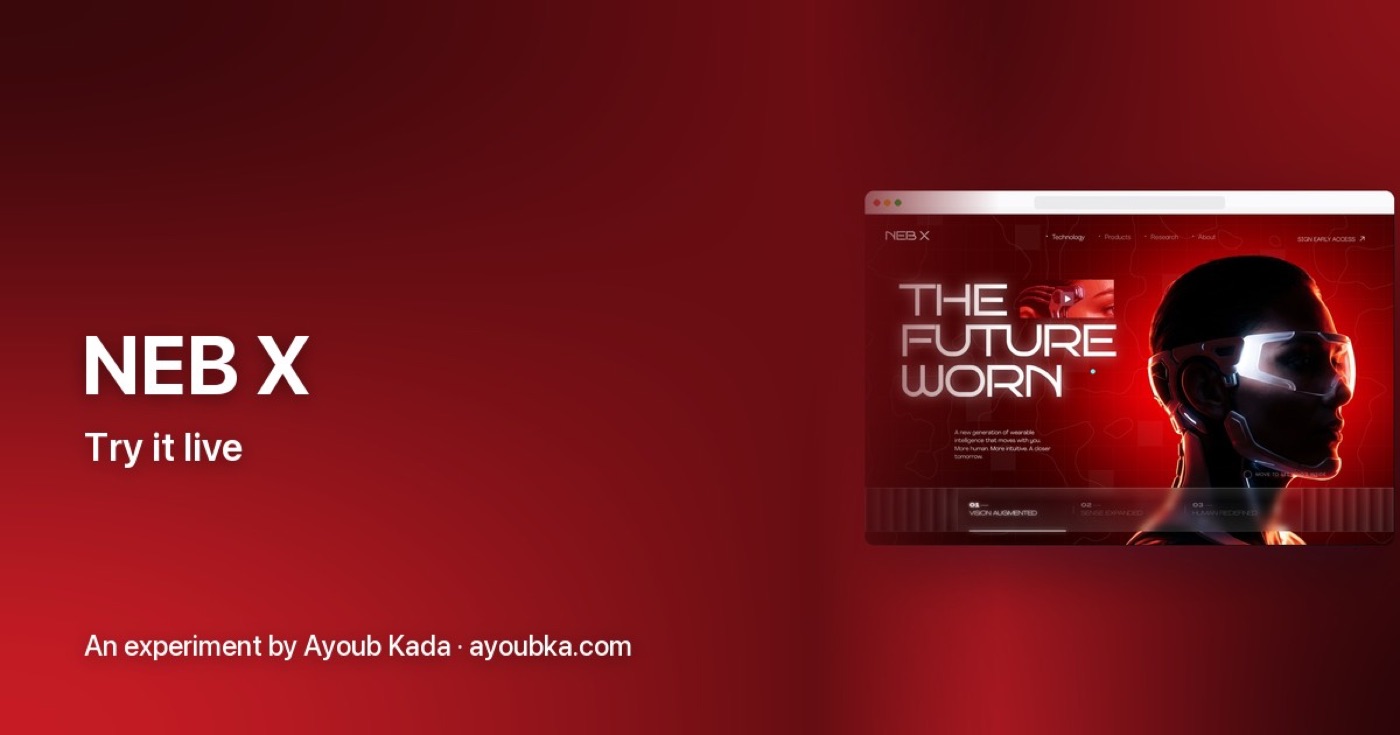
"Smudge an image on pointer drag" and "paint an x-ray reveal with the cursor" are cousins. Both are a pointer position fed into a shader. So here is how I would use the Framer Agent if I were making something like NEB X on a Framer site today:
- Design the wow moment first. One frame, the moment people stop scrolling. Everything else on the page can be normal.
- Prompt the interaction, not the look. "The image reveals under the cursor with a soft edge and fades back when the cursor leaves" gives the Agent a behavior to build. "Make it cool" gives you a filter.
- Tune by hand, then stop prompting. Once the first version runs, the controls on the canvas are cheaper than more prompts.
- Decide the touch version on purpose. On a phone, maybe the reveal follows scroll instead of a cursor. That is a design decision the Agent will not make for you.
- Add sound only if it earns it. In my experiments, the moments that feel alive usually combine motion, interaction and sound. A shader alone is a material, not a moment.
If you compare tools for this kind of site, my Figma vs Framer comparison and the earlier post on Framer MCP and agents publishing your site give the wider picture. And the other AI experiments show what happens when the effect, the motion and the sound are designed as one.
FAQ about Framer shaders and the Agent
How do you use Framer shaders with the Agent?
Open the Framer Agent and ask for the effect in plain words, for example a halftone or CRT effect, or describe an effect you saw on another site. To work on an image, select it on the canvas or drop it into the chat first. The Agent can also edit a shader that is already on your canvas.
Is Framer shader generation free?
Framer's help center says Agent chat runs on a monthly AI credit allowance per workspace, and Free plan workspaces without a subscription get 500 credits to try Agents. The update page does not say how many credits an image or shader uses. Each prompt's cost depends on its complexity.
Can Framer generate images now?
Yes. Since the November 12, 2026 update, the Agent can generate images, textures and illustrations, and it can edit an image you give it by swapping the subject, removing the background or restyling it. It can also use a generated image as the input of an image shader.
Will this replace designers who build shaders by hand?
It replaces writing the first version. It does not replace deciding what the effect is for, how it behaves on touch, how it performs on slow devices, or when to leave it out. That judgment is still the job.
What to do this week
Pick one page where an effect could carry meaning, not decoration. Write the interaction in one sentence before you open the Agent. Generate, tune on the canvas, test on your slowest phone, then decide. If you want a product designer who designs the motion, interaction and sound and ships the code too, work with me as your product designer, or see the ViewStats creator platform case study for how I work on real products.

hello@ayoubka.com
If you have a web or mobile app idea in mind or you need some advice about product design, feel free to get in touch ✉️