
Instagram Effect Builder: Filters From a Prompt. The Catch
Since Nov 9, Instagram Effect Builder turns a prompt into a Stories effect. What shipped, what's missing, and why its credit loop matters most.
Instagram Effect Builder is a new, free web tool that turns a text prompt into a Stories effect. Instagram's Edits team launched it on November 9, 2026 at edits.com/effectbuilder: you describe the look you want, add a style reference photo if you like, test it on your own photos, then submit it for a safety review. Once approved, anyone can apply it from the Stories effects browser, and your handle links back to your profile. It is open to people in the US over 18 for now. My verdict, as a product designer who has built lens and glass effects by hand and designed AI tools for creators: the interesting part is not the prompt box. It is the credit and review loop wrapped around it, because that is where AI creative tools usually fail.
Below: what Meta actually shipped, what it changes for designers who work on motion and interaction, where the hype runs ahead of the facts, and how I would use it.
What Instagram Effect Builder actually is
The official Edits announcement, written by Edits designer Cheechee Lin, describes three steps.
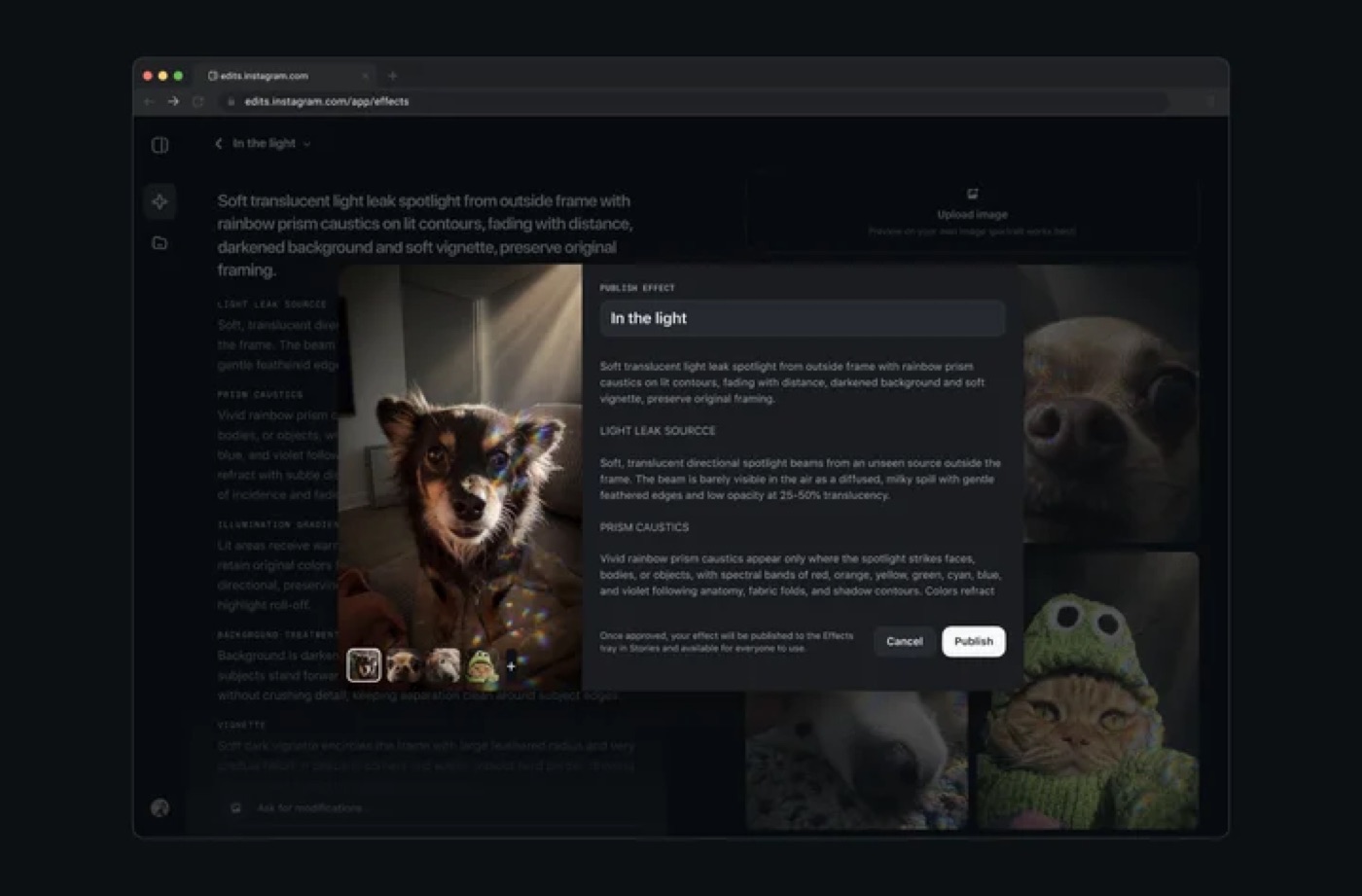
- Create and test: type a prompt, get an effect, try it on your own photos. You can refine it with more prompts and editable fields.
- Submit for review: every effect goes through a safety review before anyone else can use it.
- Share: approved effects show up in the Stories effects browser next to every other effect. People tap "Try it", and your own effects are saved under "My effects".
The pitch on the page is blunt: no design or coding experience needed. Creating and publishing is free. Launch partners during testing included creators like @karenxcheng and @dave.krugman.
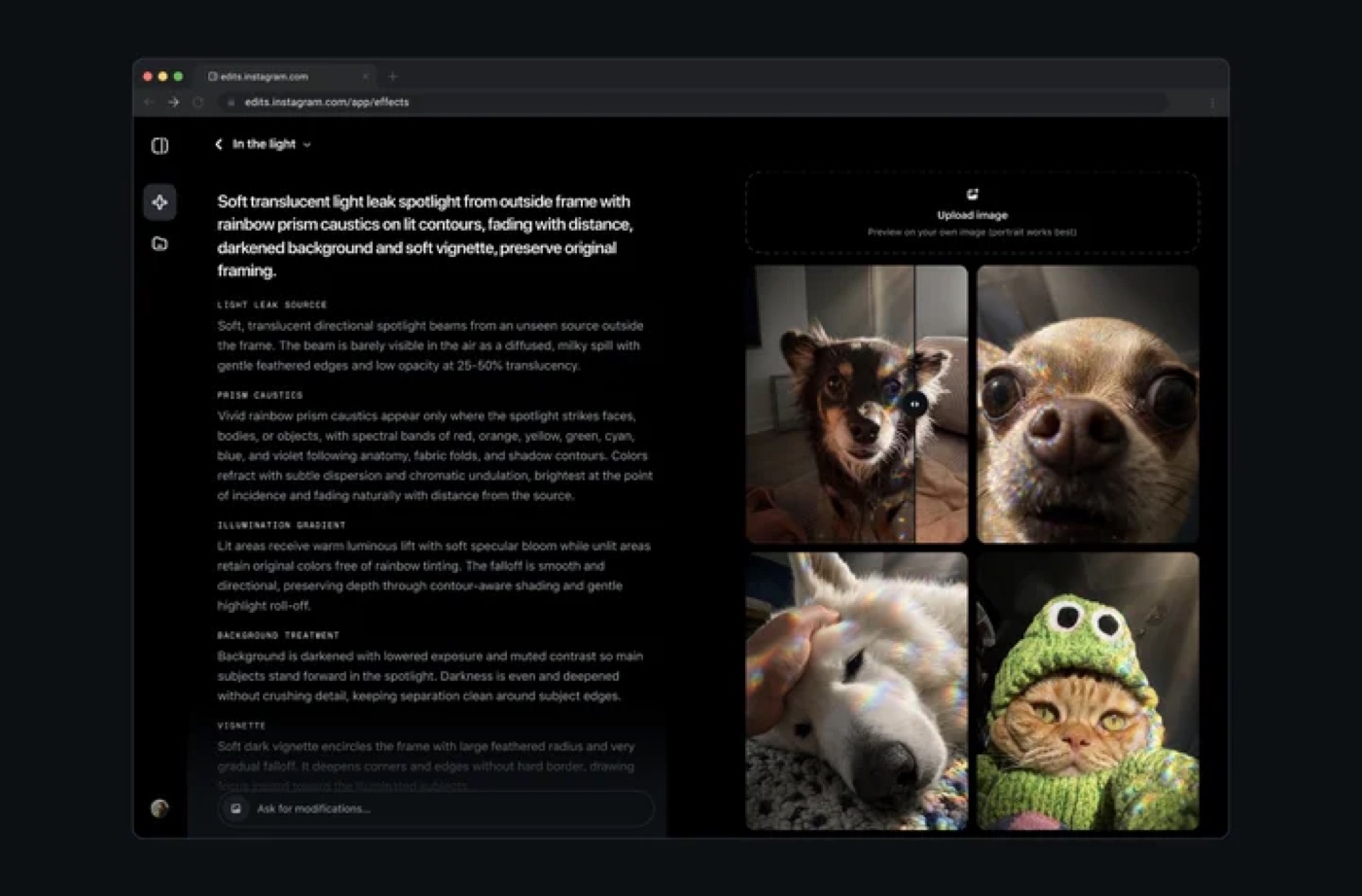
Look closely at Instagram's own screenshot. The prompt is not one line: the editor breaks the effect into named parts (light leak source, prism caustics, illumination gradient, background treatment, vignette). That is a designer's spec, written in plain words. It tells you what the tool rewards.
Social Media Today's launch coverage adds two useful details from Meta: you can upload a photo as a "style reference" so the AI borrows its color, lighting and texture, and the review usually takes less than 24 hours, with status visible in the tool's Library tab. It also points out the honest context: this builds on Restyle, the prompt-based effects Instagram shipped in October 2025. So the idea is not new. The editor, the testing step and the publishing loop are.
What Instagram Effect Builder changes for product designers
For years, a camera effect was a specialist job. You opened a dedicated AR tool, learned its patch editor or scripting, dealt with face tracking and texture budgets, then shipped one effect after a lot of work. Most product designers never touched it. The effect was a whole discipline.
Now the brief is a sentence. Three things shift.
Visual language becomes cheap to explore. If your product has a brand look (a grain, a palette, a light leak), you can test what it feels like on a real camera feed in minutes instead of describing it in a deck. That is a mood board you can wear.
The reference image becomes the real prompt. Meta says the style reference guides color, lighting and texture. My own process with AI tools starts by collecting references before I write a single prompt, because a reference carries taste a sentence cannot. Instagram seems to know it: its prompt-expansion option rewrites short prompts into longer ones, but early coverage notes a longer prompt does not guarantee a better result. Designers who keep a strong reference library win here, same as with AI video.
Distribution is built into the design. The effect is not a file you hand over. It is a product with a review step, a library, a credit line and a "Try it" button. That is the part I would study as a designer, even if you never make a filter.
Why the credit loop matters more than the prompt
I led design on the AI thumbnail and title tools at ViewStats, the creator platform built by the team behind MrBeast. We took those tools from concept to launch in roughly two weeks, and the hardest part was not the interface. It was trust. After launch, the AI thumbnail tools drew real criticism about the impact on artists and thumbnail designers, and it spread all the way to the BBC. I wrote about that in what the thumbnail backlash taught me about AI ethics in design.
The lesson I took: product decisions do not exist in isolation. When you build AI tools for a creative community, the question people ask is not "is it good?" It is "who gets credit, and who gets replaced?"
Effect Builder answers part of that in the flow itself. The maker's handle sits on the effect. Every use links back to their profile. A human review sits between generation and distribution. That is designing trust, not just designing a generator, and it is the same principle I lay out in my guide to AI product design and features people trust. Whether it is enough is another question (see below). But it is the right shape.
Hype vs reality
Here is what the launch does and does not tell you.
| What people will say | What the official page and coverage support |
|---|---|
| "Anyone can make AR effects now" | Anyone in the US over 18, on the web. No other countries announced yet. |
| "It replaces effect designers" | It makes looks and filters from prompts. Nothing official says it handles complex interactive logic, games or brand campaigns. |
| "It's totally free" | Creating and publishing is free today. No pricing for any future tier has been confirmed. |
| "Your effect goes viral instantly" | It goes through a safety review first (Meta says usually under 24 hours), then sits in the effects browser with every other effect. |
| "Creators get credit" | Yes: handle on the effect and a profile link on every use. Payment or revenue share is not mentioned. |
| "It's safe" | There is a review, but coverage notes Meta has not detailed how it stops effects that imitate protected characters or real people, or whether effects carry an AI label. |
My honest read: this is a great tool for a look, and a weak tool for an idea that needs interaction. A filter that tints your face prismatic is a style. A filter where blinking triggers something, or where sound reacts to your movement, is a design. The launch material only talks about the first.
How I would use it in my workflow
I design the motion, interaction and sound of my experiments myself and ship the code. In Say More, my glass lens avatar experiment, the web build bends glass bubbles through a WebGL fisheye lens, and the native version runs on Metal shaders in SwiftUI. Getting a lens to feel physical took real decisions: how much it distorts, where the edge highlight sits, how it moves when you touch it. A prompt tool would not have made those calls for me. It would have given me a starting point faster.
That is exactly how I would use Effect Builder:
- As a look test. Before I build a shader by hand, I would prompt three or four versions of the look, try them on real photos and pick a direction. Cheap exploration, then hand-made execution.
- As a brand probe for clients. For a consumer brand, a filter that carries its palette is a quick way to see if a visual language holds up on real faces and rooms, not just in Figma frames.
- As a study in AI UX. The review, Library tab and credit line are a working pattern for any AI feature where users publish what the model made. I would copy the structure, not the filter.
Where I would not use it: anything that needs the effect to respond to a user's action in a specific way, or that has to match a product's motion system exactly. For that I still go to code, the same way I described in my take on Framer shaders from a prompt. The model gets an effect to exist. A designer decides if it helps.
If you want to see what hand-built motion and interaction look like next to prompt-built ones, browse my AI design experiments. Each one is a working build, not a mockup.
FAQ about Instagram Effect Builder
How do I use Instagram Effect Builder?
Go to edits.com/effectbuilder on the web, describe the effect you want in a prompt (optionally add a style reference photo), test it on your own photos, then publish. It goes through a safety review, and once approved it appears in the Stories effects browser.
Is Instagram Effect Builder free, and who can use it?
Creating and publishing effects is free, according to the official Edits post. At launch it is available to people in the US who are 18 or older. No other countries have a confirmed date.
Do I get credit when someone uses my effect?
Yes. Your Instagram handle appears on the effect and people can tap through to your profile. The announcement does not mention any payment for creators.
Will Effect Builder replace AR and effect designers?
It replaces the slow part of making a simple look. It does not replace the person who decides what an effect should do, how it should respond, and whether it fits a brand. If anything, it raises the bar for effects people actually remember.
Is it the same as Instagram Restyle?
No, but it is related. Restyle (October 2025) already made effects from prompts. Effect Builder adds a dedicated web editor, style references, a testing step and a review and publishing flow.
What to do this week
If you are in the US, make one effect from your own brand palette and test it on five real photos. Note where it breaks: skin tones, low light, busy backgrounds. That list is your design brief. If you are outside the US, study the flow anyway, because the credit and review pattern is coming to every AI creative tool.
And if you are building an AI feature where users create and publish, and you want it designed around trust from day one, see how I approached it in the ViewStats creator tools case study, or work with me as your product designer.

hello@ayoubka.com
If you have a web or mobile app idea in mind or you need some advice about product design, feel free to get in touch ✉️