
Figma 3D Transform Ships as CSS. What Designers Can Build Now
Since Nov 12, a Figma 3D transform tilts any layer in X, Y and Z and copies out as CSS. What it does, the limits, and where three.js still wins.
On November 12, 2026, Figma shipped a native Figma 3D transform effect. You can now tilt any vector, image, frame, component or text layer on the X, Y and Z axes, push it closer or farther with Depth, give a parent frame a shared Perspective, and animate the whole thing in Figma Motion. In Dev Mode the result copies out as plain CSS: rotateX, rotateY, translateZ, perspective and transform-style. Figma calls it open beta, for Full seats. My verdict: this is not 3D modeling. It is CSS 3D, cards and planes in space, and that is exactly why it is useful. What you design is what the browser can render, with no plugin export and no guesswork in handoff.
Below: what shipped, what it changes for product designers, the limits the launch post does not lead with, and where it fits next to the real 3D I build with three.js.
What the Figma 3D transform actually is
The official source is Figma's help article on creating 3D effects, plus the launch story on the Figma blog by Chad Colby, Figma's Director of Motion Design. 3D transform lives in the Effects section, next to shadows and blurs. It is non-destructive: the original layer stays editable underneath, and you can hide or remove the effect at any time.
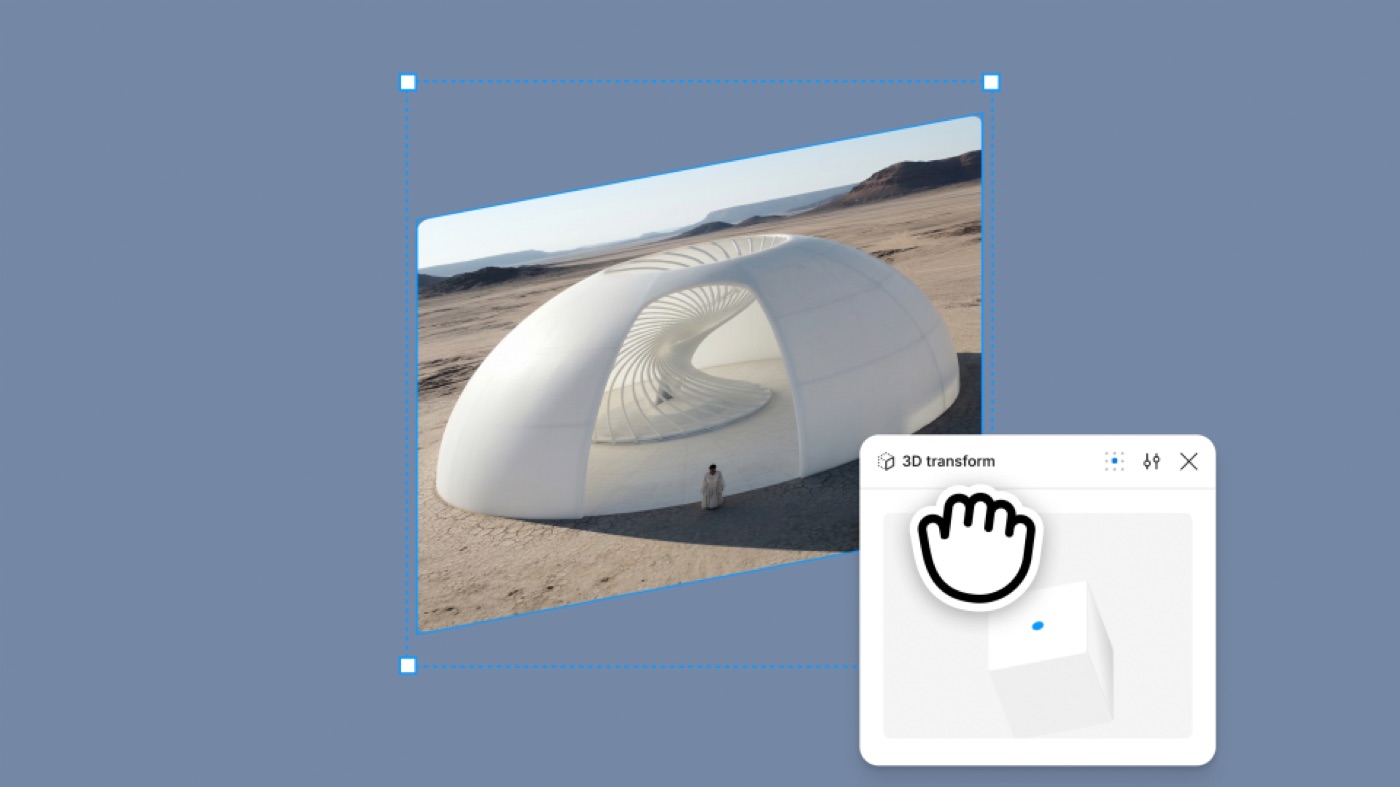
There are four controls worth knowing.
Rotation. X tilts a layer forward or back, Y tilts it left or right, Z spins it in the canvas plane. You drag handles on the canvas or type values.
Depth. Moves the layer along the Z axis, toward or away from the viewer. It only shows once the parent has Keep nested layers 3D turned on and a Perspective or rotation applied.
Perspective. An effect you put on the parent frame so every child shares one camera. Smaller values exaggerate the depth, larger values flatten it. The slider starts at what Figma calls a safe camera distance for the selection size.
Backface and origin. You choose whether the back of a rotated layer shows (as a mirror of the front), and you set the rotation point by value, by dragging, or from presets. For a double-sided card, Figma's own advice is two layers, front and back, with backfaces hidden.
Then there is the part I care most about. Dev Mode lets you inspect and copy the CSS transform. Depth maps to translateZ, the nested setting maps to transform-style (preserve-3d or flat), and Perspective maps to perspective. A coding agent connected to the Figma MCP server can read the 3D effects and implement them.
Figma 3D transform vs Spline vs three.js
The word "3D" is doing a lot of work in the headlines, so here is the honest map.
| Figma 3D transform | Spline | three.js (custom code) | |
|---|---|---|---|
| What it moves | Flat layers (planes) in a shared 3D space | Real 3D models, materials, lights | Anything: meshes, shaders, physics |
| Output | CSS transforms you can copy, or Figma Motion video and Lottie | Hosted embed or exported scene | Your own WebGL code |
| Best for | Card flips, tilted mockups, spatial layouts, depth on UI | Hero objects on marketing pages | Configurators, games, physics, custom materials |
| Handoff cost | Low: the values are already CSS | Medium: you depend on the runtime | High: a design engineer builds it |
| Can it do a gummy bear? | No | A static one | Yes, with physics |
That last row is not a joke. My Haribo pick and mix experiment drops translucent gummy bears into a bag on a live scale, and it needed three.js, Rapier physics and a custom jelly shader. I wrote up how to make a 3D configurator from that build. Figma's 3D transform would not have built any of it, and it is not trying to. If you are choosing between the other two columns, my Spline vs three.js comparison covers that call.
What it changes for product designers
Mockups stop being a plugin chore. Tilting a screen onto a perspective plane used to mean a third-party plugin and a flattened image. Now it is an effect on a live frame, so when the screen changes, the mockup changes.
Spatial UI becomes reviewable. Card stacks, carousels that curve away, a flip from front to back of a payment card: these were described in a ticket and built blind. Now they sit in the file where the team can comment on them.
Motion gets a third axis. In motion mode you can keyframe Rotate X, Rotate Y and Depth, and Perspective too. Combined with the physics springs Figma added to Motion two days earlier, a card flip can now have a real spring settle in the design file.
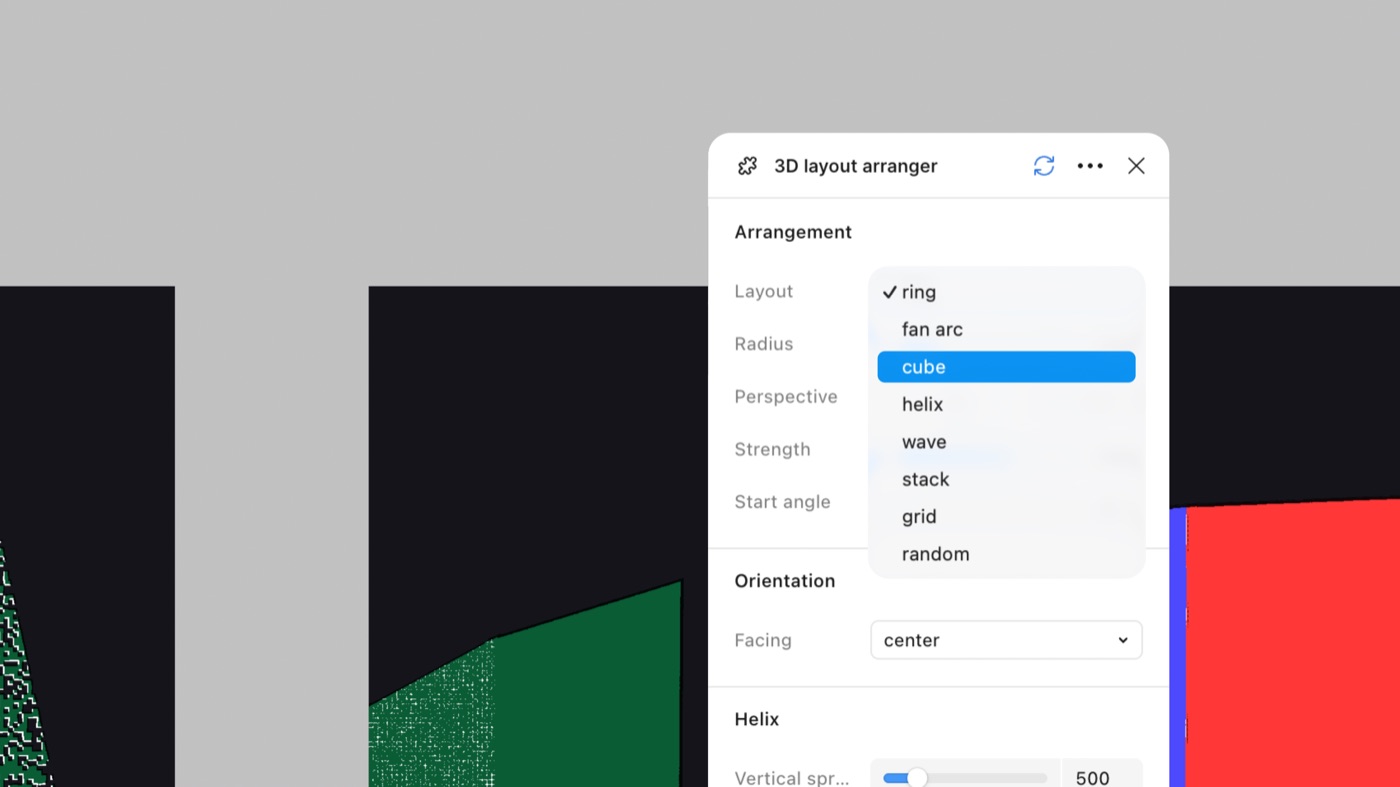
The agent does the math. Figma's launch story is about this. One designer on the Brand Studio team, Deanna Gueli, described it as "the agent did math, and I did the creative stuff." Another, Ben Hill, had the agent build a plugin that arranges elements in a grid, helix, ring or scatter, because placing things in 3D by hand is slow and imprecise. That split, judgment for the human, geometry for the machine, matches how I work with Claude.
Hype vs reality
It is planes, not objects. Every layer is still flat. You can build a cube from six frames, and Figma's examples include one, but there are no meshes, no lighting model and no materials. Anything that needs volume belongs in Spline or code.
Keep nested layers 3D has a price. The launch post says 3D works alongside shaders. True for the transformed layer itself: text, fills and shader fills render with it. But the help article is clear that on a parent frame with Keep nested layers 3D on, opacity is disabled, blend modes, shaders, other effects and clip content are unavailable, and existing fills and strokes are hidden. That is not Figma being lazy. Browsers do the same thing: on MDN's transform-style reference, properties like opacity, overflow and filters force a 3D group back to flat. Figma is showing you the real constraint early, which is good, but it will surprise people who expect a glassy card container that also holds 3D children.
Animation is partial. The help article lists Rotate X, Rotate Y and Depth as animatable, plus Perspective. It does not mention prototyping at all, so for a clickable flip you should not assume prototype interactions support it yet.
Beta and seats. The blog calls 3D transforms open beta for Full seat users. The help page says all plans, with a Full seat and edit access. If your team runs on Dev or Collab seats, check before you plan a review around it.
Motion sickness is your job. Big rotations and deep perspective look great in a launch video. In a product, they need a reduced-motion fallback. Figma copies the transform, not the media query.
Where it fits in my workflow
I design in Figma, then take the design into code through the Figma MCP with Claude. I did the same at ViewStats, where my role grew from lead product designer to design engineer on the MrBeast creator platform: I built React components and opened pull requests myself. In that loop, the worst handoff is always motion and depth, because a static frame cannot say how far a card tilts or where it pivots. This feature fixes exactly that gap. The rotation, the origin point and the perspective distance are now values in the file, and an agent reading them through the MCP gets numbers, not a description.
So here is how I would split the work. Interface depth (a card that flips, a tilted preview, a spatial gallery) I would now design in Figma and let it ship as CSS. Real objects, physics and materials stay in three.js, where I already build them. My Payno card experiment, a bank card you freeze and then shatter, is a good example of the line: a flip of that card is now a Figma job, the ice breaking is still code.
The bigger point is the same one I made about Figma code layers and Figma shaders: every release that makes the design file speak the codebase's language shortens the loop between designer and shipped product. That is the whole case for what a design engineer does.
Figma 3D transform FAQ
How do I add a 3D transform in Figma?
Select a layer, click the plus in the Effects section and choose 3D transform. Drag the on-canvas handles or type rotation values. To give several layers one shared viewpoint, add the Perspective effect to their parent frame and turn on Keep nested layers 3D.
Can I export a Figma 3D transform to CSS?
Yes. In Dev Mode, select the layer and copy its CSS transform. Depth becomes translateZ, Perspective becomes perspective, and the nested setting becomes transform-style: preserve-3d or flat.
Can you animate 3D in Figma?
Yes, in Figma Motion. Switch to motion mode and add keyframes for Rotate X, Rotate Y, Depth or Perspective, then tune them on the timeline. You can also ask Figma's agent to add the motion for you.
Is Figma 3D transform free?
Figma lists it on all plans but it requires a Full seat and edit access to the file, and the launch post calls it open beta. Check your seat type before you count on it.
Can Figma import 3D models now?
No. The feature rotates and positions flat layers in space. For real 3D models, use a tool like Spline or build the scene in three.js.
What to try this week
Pick one card in your product that should flip, tilt or stack. Build it with 3D transform, put a Perspective on the parent, keyframe a single Rotate Y with a physics spring, and copy the CSS from Dev Mode into a branch. If the code matches the file on the first try, you have found your new handoff. If it does not, you have found where your design system needs depth tokens.
More builds where I take design all the way to code are on my AI design experiments page. And if your team wants spatial, physical UI designed and shipped by the same person, work with me as your product designer.


hello@ayoubka.com
If you have a web or mobile app idea in mind or you need some advice about product design, feel free to get in touch ✉️