
Figma Code Layers Now Read Your Prototype. Is Handoff Over?
Since Nov 3, Figma code layers read your prototype connections and build from them. What shipped, what it costs in credits, and where it fits a real workflow.
Figma code layers got three updates in the first week of November 2026. On November 3, Figma said the code layer agent now reads the prototype connections and interactions between your frames when it turns them into a code layer. On November 2, shaders became generally available and can be brought into code layers. Also on November 3, cloning connected GitHub repositories into Figma became the default for new connections. My one-line verdict: your prototype wiring is now a brief the AI actually reads, which is the biggest step yet toward a design file that builds itself into a working flow. It does not end the need for a designer who knows how the product should behave. It rewards that designer.
Below: what code layers are, what this week changed, where the hype runs ahead of the help center, and how it fits the way I already work, from Figma frame to shipped code.
What Figma code layers actually are
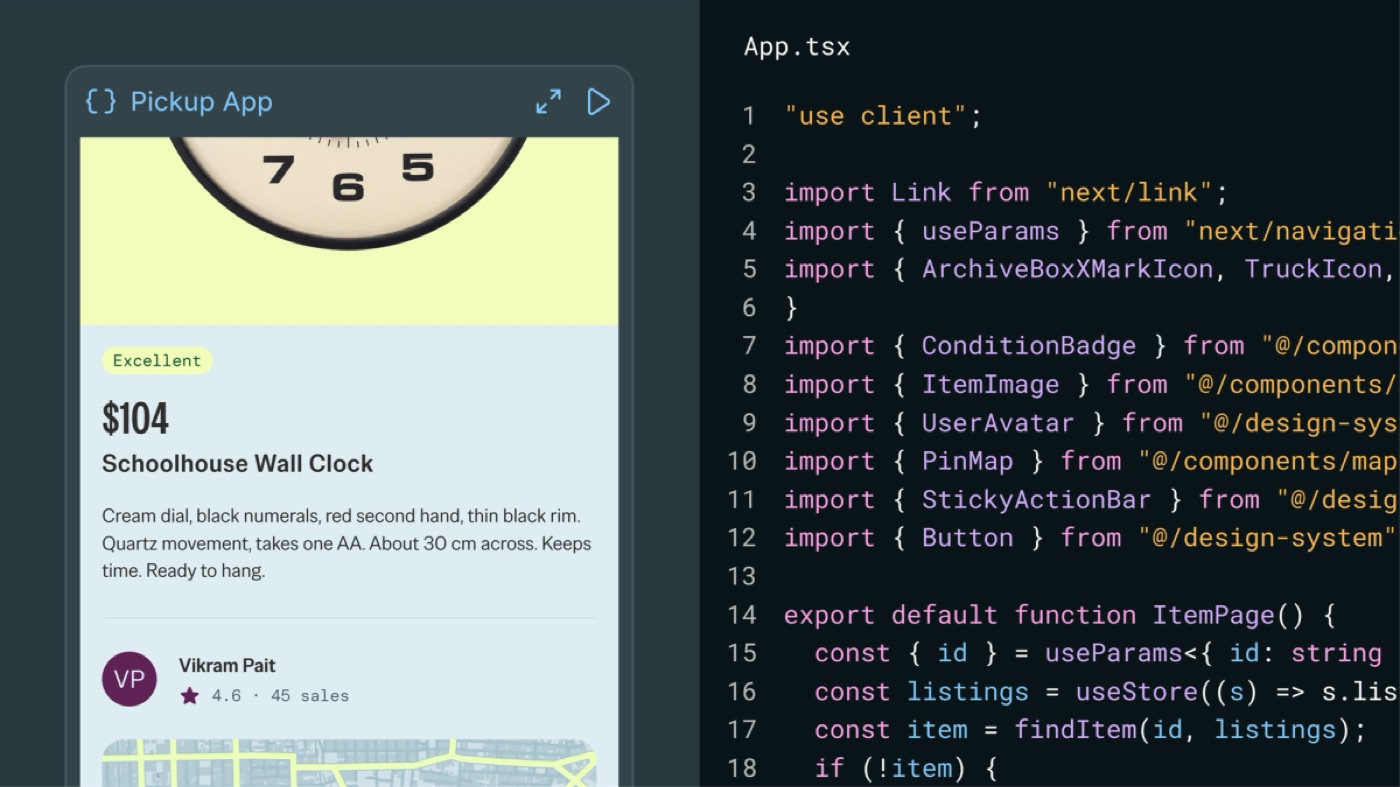
Figma's help article on code layers defines one as "an interactive prototype backed by running code that sits directly on the canvas." It is a layer like any other. You can move it, duplicate it next to another version, press Play to interact with it, or open it to edit.
You can make one in a few ways: draw an empty code layer with the Code tool (shortcut B) and prompt the Figma agent, select design frames and ask the agent to turn them into a code layer, capture a live web page with the Figma Chrome extension, upload a local folder, or connect a GitHub repository. Editing happens by prompting the agent, in the code editor, or with point-and-edit, where you click an element in the preview and change its color, padding or text style.
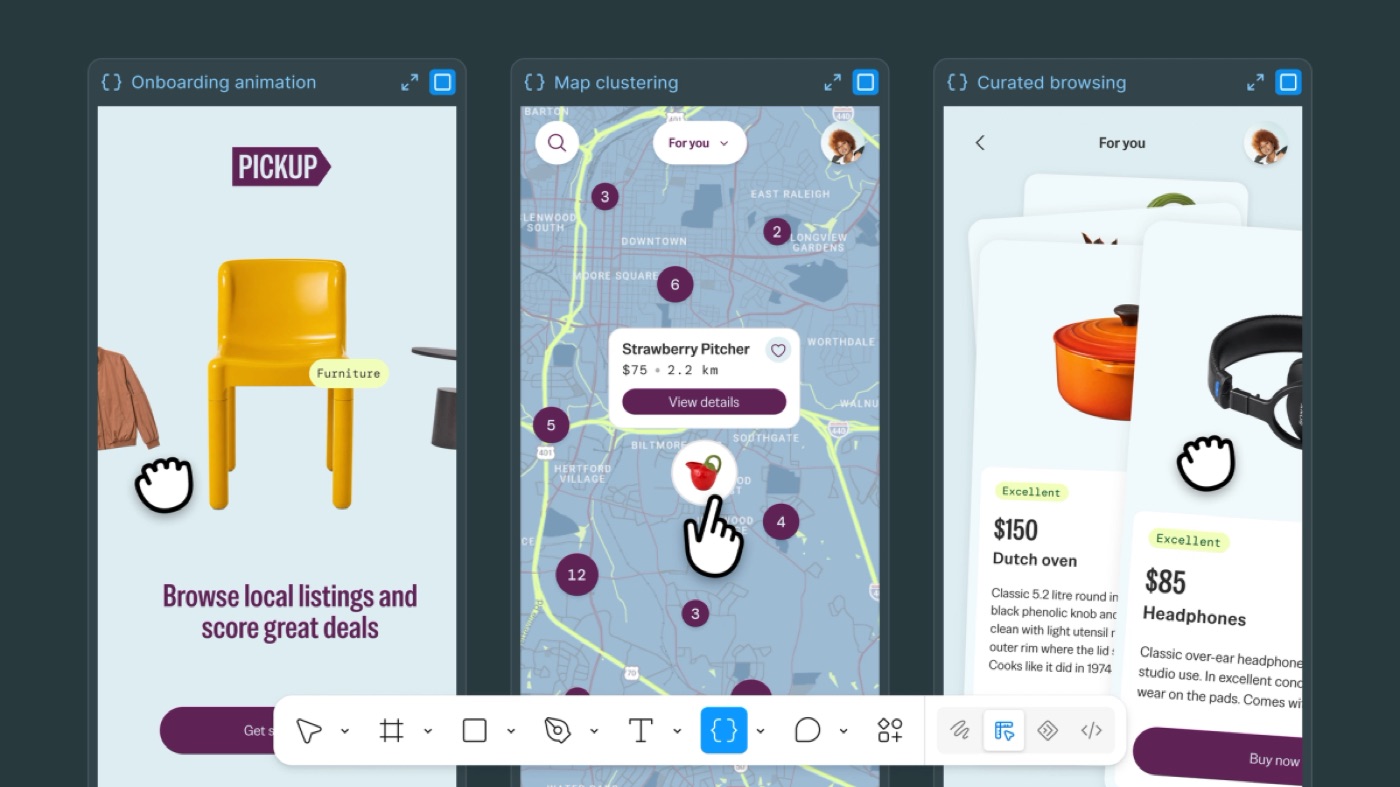
The round trip is the part designers should care about most. Extract designs turns a code layer back into editable canvas layers: the current state, one element, or a recorded flow. You can change those layers by hand and push the changes back into the code layer. Code layers are in open beta on Starter, Professional, Education, Organization and Enterprise plans, and you need edit access to the file.
What changed this week, release by release
All three entries are on Figma's official release notes. Read together, they say the same thing: Figma wants the code layer to be where the design becomes the product.
| Date | Release | What it means for a designer |
|---|---|---|
| Nov 2, 2026 | Shaders export up to 4096px, can be included in code layers, now generally available | Visual effects you design on the canvas can come along into the working prototype instead of being faked with a video |
| Nov 3, 2026 | The code layer agent reads prototype connections and interactions between frames | Your noodles and triggers are now instructions. A wired flow builds closer to how you meant it to behave |
| Nov 3, 2026 | Cloning connected GitHub repositories is on by default for new connections, all plans | Less admin friction to get the real codebase into Figma, branch it, and open a pull request |
| Help center, now | "Code layers will use AI credits in open beta" | Every prompt has a cost again, so a clear design before you prompt saves money, not just time |
What Figma code layers change for product designers
For years, the prototype was the part of my work that died at handoff. I wired every screen, every tap, every back button, and then a developer rebuilt all of it from a written spec and a video. The connections were proof of intent, never input.
Reading prototype connections flips that. If the agent knows that tapping "Continue" on frame 2 goes to frame 3 with a slide, the code it writes starts from your flow, not from its guess. That changes three habits.
Wiring becomes worth the time again. A lot of designers stopped building detailed prototypes because nobody used them. Now a well-wired file is a better prompt than any paragraph you could type.
Interaction design moves up the list. If interactions are context, the designer who thinks about states, transitions and edge cases gets a better build. The one who only draws static screens gets a generic page with buttons that go somewhere.
The gap between design and the repo gets shorter. With GitHub cloning on by default, a code layer can sit on top of the team's real code, with branches and pull requests. That is the same loop I described in how to become a design engineer: the first pull request is the moment your role changes.
Hype vs reality
The launch posts make it sound like the file now ships itself. The help center is more honest, and it is worth reading before you plan a sprint around this.
- It costs credits. The help center says code layers use AI credits in open beta, and the cost varies with task complexity. It does not publish a rate. Figma's own community forum has a long thread titled "Figma Make AI credit limits not feasible", so credit burn is a known pain point for Figma's AI tools. Budget for it.
- Imports are slow and not universal. Figma says imports "can take 10 minutes or more", some projects need changes to run in a code layer, and not every GitHub repository works.
- Shaders have strings attached. Shaders in code layers are not supported in the Figma desktop app or other Chromium browsers, and need a Chrome flag. Great for exploring, not something to promise a client yet.
- Your real components are not always there. Code layers may not use your production component code unless your team has the code sources set up, so the output can still drift from your design system.
- Enterprise is the only plan that can opt out, by turning off AI features. Everyone else gets it in the toolbar when it rolls out.
None of these are deal breakers. They just mean code layers are a prototyping surface that is getting closer to production, not production itself.
How I would use Figma code layers in my workflow
My process already looks like this, with different tools. I wrote it up on X as "I stopped handing off designs. I ship the product now": Figma is the brief, not the deliverable. I design the key screens, send them to Claude through the Figma MCP, ask for the real build in SwiftUI or for the web, never a prototype, then prompt every small detail until it feels right. The first build takes minutes. Getting it to feel right takes the evening.
Code layers bring part of that loop inside Figma. Here is where I would and would not use them.
I would use them for the flow, early. Wire the onboarding or checkout, turn it into a code layer, press Play, and feel the transitions before anyone writes production code. That is where wrong ideas are cheapest to kill. At ViewStats, the activation fix was about value communication across onboarding moments, empty states and prompts (the full story is in the ViewStats creator platform case study). That kind of work lives in flow and timing, and it is exactly what a static frame hides.
I would not use them for the wow moment. Every build I shipped this year has one moment people remember: water pouring into a glass, gummy bears falling onto a scale. In the Pulse Health experiment the water is a simulation running on the phone, not a video. In the Haribo 3D gummy bear configurator, most of the hours went into making the bears fall right. That level of physics and feel still needs the real stack (SwiftUI, three.js, a physics engine) and a lot of small, boring fixes. A code layer is a sketch of that, not the thing.
I would wire the prototype like it is a spec now. Name the frames, connect every state, include the error and empty states. If the agent reads connections, missing connections become missing behavior. There is no magic prompt. There is a proper design first, and this update makes that literally true.
If you are deciding between this and other AI build tools, I compared the options in Figma Make vs v0 and Claude Code vs Cursor. And if you missed it, the same week Figma also made Figma AI icons come out as editable vectors, ready to animate in Figma Motion. The direction is clear: design, motion and code in one file.
Figma code layers FAQ
What is Figma code layers?
A code layer is an interactive prototype backed by running code that sits on the Figma canvas next to your frames. You can play it, edit it with the Figma agent or in a code editor, and extract it back into editable design layers.
Do Figma code layers use AI credits?
Yes. Figma's help center says code layers use AI credits in open beta, and the cost varies with how complex the task is. Importing through the Figma MCP server does not use credits, but later prompts to the agent do.
Does the code layer agent read my prototype interactions?
Since November 3, 2026, yes. When you create a code layer from design frames, the agent reads the prototype connections and interactions between them and uses them as context for the build.
Will Figma code layers replace front-end developers?
Not for production work today. Imports can fail, real components are not always connected, and shaders only run in a specific browser setup. What it replaces is the throwaway prototype. The judgment about how the product should behave still comes from the designer, which is why I think the design engineer role grows from here. I explained the role in what a design engineer is in software.
Can I use code layers on the free plan?
Figma lists code layers for Starter, Professional, Education (not K-12), Organization and Enterprise plans, in open beta, and you need edit access to the file. Check the toolbar for the Code icon to see if it has reached your account.
What to do this week
Open one real flow you are working on, wire every connection including error and empty states, and turn it into a code layer. Play it. Note where it feels wrong, fix the design, not the prompt, and try again. That one exercise will tell you more than any launch thread.
If you want this way of working on your product, the full loop from Figma to a shipped build with motion and sound, you can see more of my builds in my AI design experiments and my product design work, or hire a product designer who ships the code.


hello@ayoubka.com
If you have a web or mobile app idea in mind or you need some advice about product design, feel free to get in touch ✉️