
Cursor Build Live Apps: Designers Can Ship Tools Now. Should You?
Since Nov 5, Cursor build live apps turns a prompt into a hosted app with a database and sign-in. What it does, what the docs leave out, and where designers fit.
Cursor build live apps is the feature Cursor shipped on November 5, 2026: you start a cloud agent, say you want an app, and Cursor scaffolds the web app, adds a Postgres database if it needs one, puts sign-in in front of it with Cursor SSO, hosts it, and gives you a live link on a domain you pick. Nothing goes public until a security review passes and you press publish. My one-line verdict as a product designer who already ships code: this is the first time a designer on a team with Cursor can turn an idea into a working internal tool in one place, without asking anyone for a database or a server. It is great for tools and prototypes people really use. It is not where I would host a real product yet, because the docs do not list a hosting price, limits or a way to move your data out.
Below: what the feature is, what it changes for designers, where the hype runs ahead of the docs, and where it fits the way I work.
What Cursor build live apps actually is
The official Cursor changelog entry, "Build Live Apps in Cursor", is dated November 5, 2026. The pitch is simple: describe an app, and Cursor builds it, sets up a database, configures auth and deploys it, so teammates can use it through a shared link. Cursor's own line is that "anyone in your org can now build useful tools for their work."
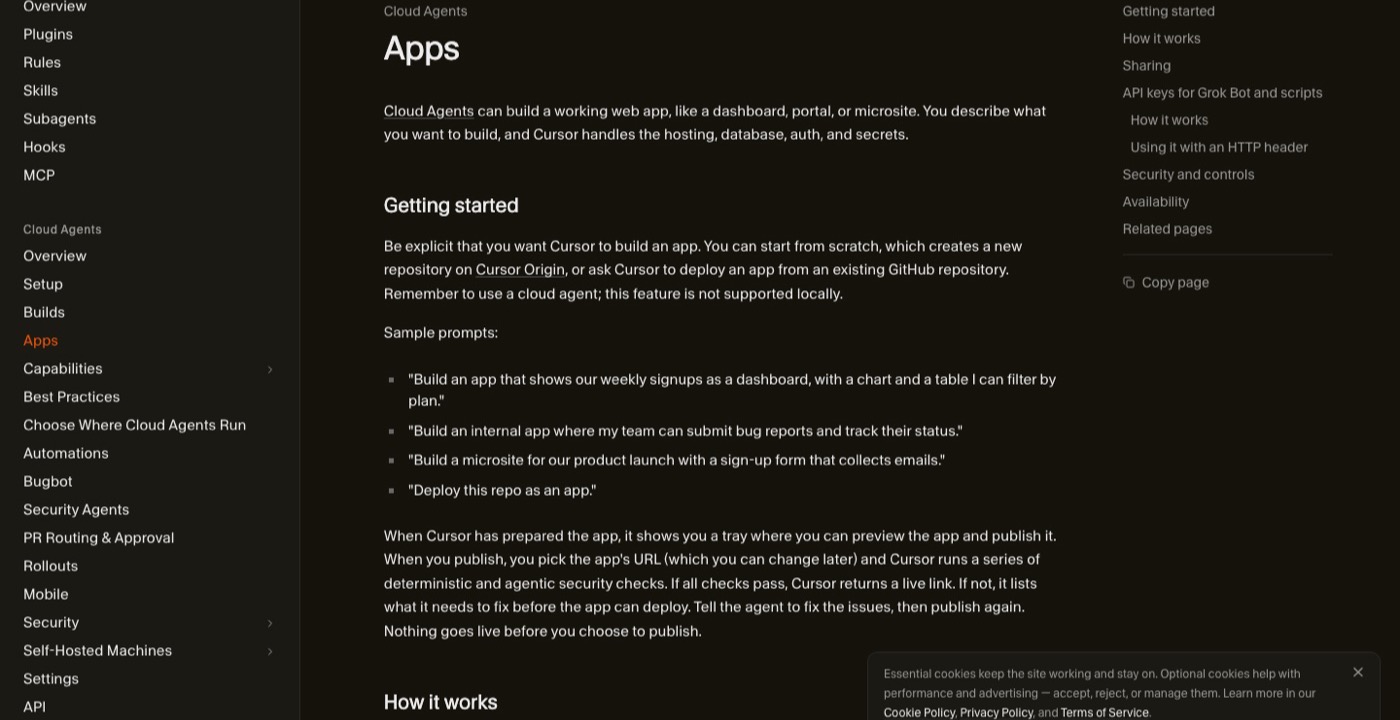
The Cursor Apps documentation fills in the details that matter:
- It only works from a cloud agent. The docs are direct about it: the feature is not supported locally.
- You can start from scratch (Cursor creates a new repo on Cursor Origin) or deploy an existing GitHub repo. GitLab is listed as coming soon.
- A tray lets you preview the app and publish it. You choose the URL at publish time and can change it later.
- Private and team apps sit behind Cursor sign-in. On individual plans you can share an app publicly with anyone who has the link. On Teams and Enterprise, public sharing is off by default and an admin has to allow it.
- Four checks always run before publish: no secrets written in app files, no credential files, no .env files, no source maps. An AI security review runs on top and blocks serious issues.
- Secrets are entered by you, and the docs say the agent never sees their values.
- It is available on all paid plans with cloud agents enabled.
Cursor's own examples are telling: internal ops tools like event registration and desk seating, customer presentations with slides and demos, onboarding experiences, sales pipeline dashboards. These are not startups. They are the small tools every team needs and nobody has time to build.
Cursor for designers: what this changes
"Is Cursor for designers" is one of the questions people type into Google right now. Until last week my honest answer was: yes, if you are willing to also handle where the code runs. That last part is where most designers stopped. You could get a beautiful prototype running on your laptop, and then you hit Vercel settings, environment variables, a database and an auth library. That is a different job.
Build live apps removes that wall for one specific kind of thing: a tool for people you already work with. Three changes stand out to me.
A prototype can be the real thing. A clickable Figma prototype fakes the data. A live app with Postgres keeps what people type. If you are testing a research intake form, a feedback board or a content calendar, a version that actually saves answers tells you far more than one that pretends to.
Designers can build their own tools. Most design teams have a spreadsheet that should have been an app: a design QA tracker, a list of screens waiting for review, a library of user quotes. Now the designer who feels that pain can build the fix and share it behind company sign-in, the same afternoon.
The bar moves to judgment, not setup. When anyone can deploy, the difference is whether the tool is clear. At ViewStats I learned that people rarely want more information, they want clarity. That is exactly what makes or breaks an internal dashboard, and I wrote about it in dashboard UX best practices. A generated dashboard with twelve charts is easy now. One that answers "what should I do next" is still design work.
Hype vs reality
The launch reads like "prompt in, product out." The docs tell a more careful story, and the gaps are worth knowing before you put anything real on it.
| What the hype suggests | What the official docs say | What I would do |
|---|---|---|
| Anyone can ship an app | Paid plans with cloud agents only, cloud agent only, not local | Check your plan includes cloud agents before you plan a workflow around it |
| Hosting is included | The changelog and Apps docs list no hosting price, quota or usage limit | Use it for internal tools and prototypes until pricing is published |
| It is secure by default | Four fixed checks plus an AI review; admins can approve some blocked publishes | Treat the review as a second reader, not as your security plan |
| Share with the world | Public links only on individual plans or when a team admin allows it | Keep client and user data behind team sign-in |
| Your app, your data | Code lives in git; the docs do not explain backups or exporting the database | Keep anything you cannot lose somewhere you can export from |
A write-up on DEV Community raised the same points from the docs: no price line for app hosting or Postgres on the pricing page, hosting provided "as is", and no stated exit path for the data. Those are fair. None of them make the feature bad. They make it a tool for a certain job.
There is also a design point nobody in the launch coverage mentions. When a cloud agent builds the whole app, it also picks the interface. Without a design to follow, you get the same generic page every agent makes: a centered card, a gradient, a table. The fix is the one I use every day: give the agent a real design first.
Where it fits in my workflow
I already work as a designer who ships. At ViewStats, the creator platform built by the team behind MrBeast, my role grew from Lead Product Designer into design engineer. I worked in the codebase with Cursor, Claude Code, React, TypeScript and GitHub, built React components and opened pull requests. The full story is in the ViewStats creator tools case study. That loop is why I believe what a design engineer does is becoming the default for senior product designers.
My process for personal builds is the one in my AI design workflow from idea to App Store: Figma is the brief, the agent builds from the frames, and I spend my time on the moment that makes people smile. You can see the results in my AI design experiments, like the 3D configurator that weighs gummy bears live, with real physics running in the browser, not a mockup.
Here is where Cursor build live apps would slot in, and where it would not:
- Yes: a research tool. Interview notes, tagged quotes, a board the team can filter. It needs a database and sign-in, and nobody outside the company should see it.
- Yes: a client review room for a project, with the prototype, the decisions and a feedback form, shared with specific people.
- Yes: a design QA tracker that the developers and I both update, instead of a spreadsheet nobody trusts.
- Not yet: a public product with real users and payments. Until pricing, limits and data export are documented, I would ship that on infrastructure I control.
- Not for: my experiments with shaders, 3D and sound. They are front-end heavy and do not need a database, so static hosting is simpler.
If you are choosing between agents for this kind of work, my Claude Code vs Cursor comparison covers how the two feel day to day, and the v0 vs Lovable vs Bolt comparison covers the app builders Cursor is now competing with. Last week I also wrote about Figma code layers reading your prototype. Put the two launches side by side and the direction is clear: the design file is becoming the brief, and the deploy button is moving closer to the designer.
How to try it without making a mess
If you want to test it this week, here is the order I would follow:
- Pick a tool your own team needs, not a product idea. Small, internal, low risk.
- Design the one main screen in Figma first: the empty state, the filled state and one error. That gives the agent something better than its default layout.
- Start a cloud agent and ask clearly for an app, with the data it needs to store and who should see it.
- Preview in the tray and test it like a user would. Try to break it.
- Publish with team visibility, never public, until you know where the data lives.
- Ask two teammates to use it for a week and watch where they get stuck.
FAQ about Cursor build live apps
Is Cursor build live apps free?
No. Cursor says it is available on all paid plans with cloud agents enabled. The changelog and docs do not list a separate price for hosting or the Postgres database, so check the Cursor pricing page before relying on it for anything big.
Can I build live apps in Cursor locally?
No. The Apps docs say the feature is not supported locally. You have to start a cloud agent and ask it to build an app.
Is Cursor good for designers who cannot code?
It is good for designers who are willing to read what the agent did and test it carefully. You do not need to write the code yourself, but you do need to know what a good flow, a clear empty state and a safe sharing setting look like. That is design judgment, and it matters more now, not less.
Can I share a Cursor app publicly?
On individual plans, yes, with anyone who has the link. On Teams and Enterprise, public sharing is off by default and a team admin can turn it on or block it.
Will tools like this replace product designers?
They replace setup work, not the decisions. An agent can deploy an app in minutes, but it still needs someone to decide what the app should do and why. I went deeper on that in will AI replace product designers.
If your team wants internal tools or a product that people actually understand, designed and built by the same person, you can hire a product designer who ships code. Bring the spreadsheet you hate. That is usually the best first app.


hello@ayoubka.com
If you have a web or mobile app idea in mind or you need some advice about product design, feel free to get in touch ✉️