
Adobe MCP for Claude Is Coming. What Designers Can Use Today
Adobe MAX 2026 previewed an Adobe MCP for Claude that edits real PSD and After Effects files. What ships in 2027, what works now, and where it fits.
On November 10, 2026, at Adobe MAX, Adobe previewed an Adobe MCP for Claude and other agents: local MCP integrations that let the agent you already use call Photoshop, Illustrator, Premiere and After Effects, working inside your native project files with layers, vectors, bins and sequences still editable. Adobe says it reaches Creative Cloud customers in early 2027. The same day Adobe previewed Firefly Builder, a private beta that turns an idea into a working prototype of an app, website or portfolio. My verdict: the MCP is the real news, because it moves Adobe from "a tool you open" to "a tool your agent calls". Builder is a waitlist, not a Figma replacement yet.
Below: what Adobe actually announced, what you can already use today, what changes for product designers, the hype vs reality, and where this fits in the way I already build with Claude and the Figma MCP.
What Adobe actually announced at MAX 2026
The official source is Adobe's MAX post, "Explore new ways to create across Creative Cloud and Adobe Firefly" on the Adobe blog. Strip out the marketing and there are four things a product designer should know.
MCP integrations (preview). A third-party agent calls Photoshop, Illustrator, Premiere and After Effects when a task needs them. It runs locally on your computer, so the agent edits the real file, not a flattened export. Adobe's own example: remove a logo from one campaign asset, then ask the agent to cascade the change across the rest of the campaign, and step in by hand whenever you want. If the agent is also connected to other MCP tools like Google Drive or Slack, it can pull a brief from a doc and share the result back. Timing, in Adobe's words: coming to Creative Cloud customers in early 2027.
AI Assistant (beta) inside Premiere, Illustrator, InDesign, After Effects and Frame.io. You describe a multi-step task, it runs it in the context of your file, you refine with the normal tools.

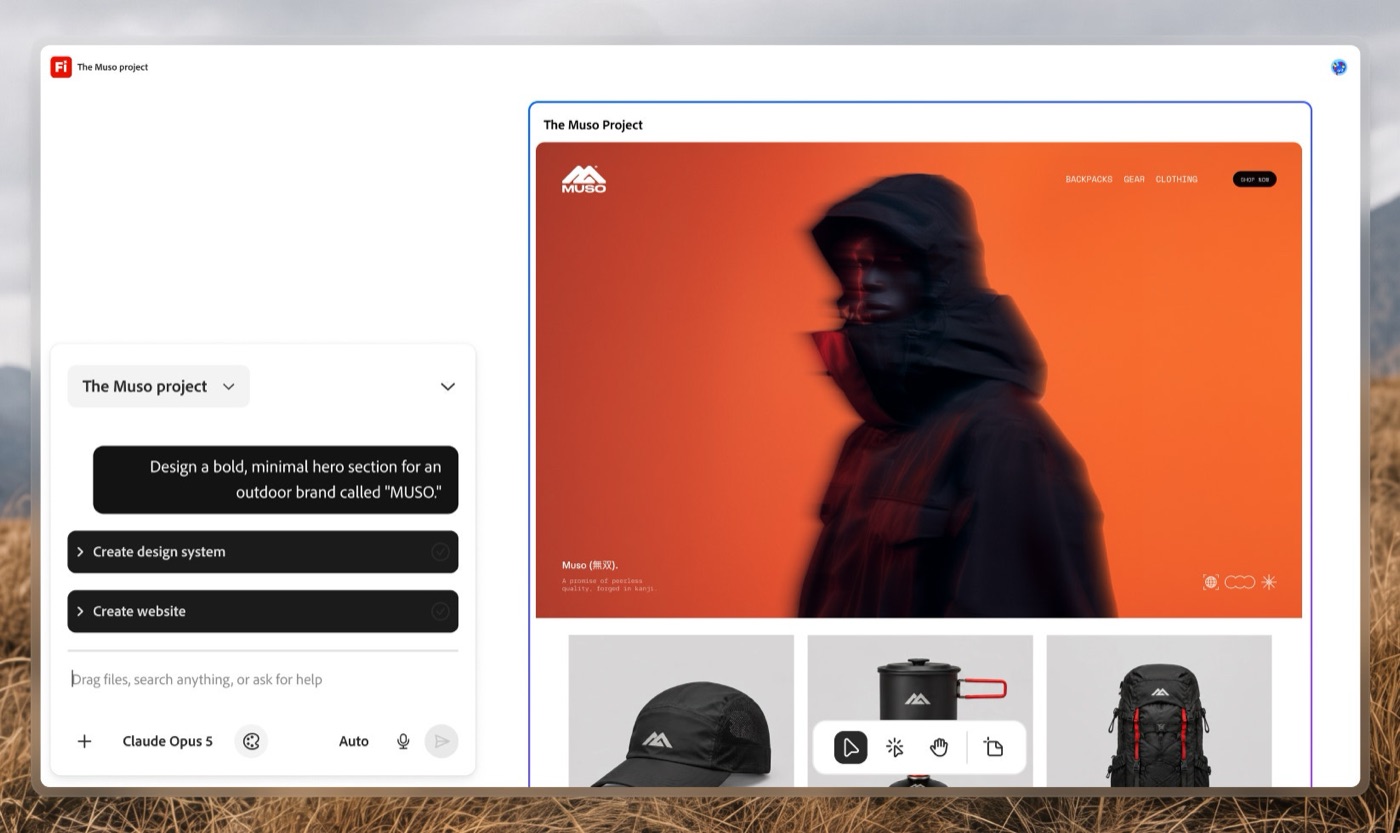
Firefly Builder (private beta). Adobe describes it as a way to turn an idea into a working prototype of an interactive app, website or digital portfolio, keeping consistency across iterations, mixing prompts with direct editing, and exploring several directions in parallel. Access is a waitlist. One detail in Adobe's own preview image: the model picker in Builder shows Claude Opus 5, so the prompting layer is not only Adobe's own models.
Firefly Design (beta). Raster, vector, motion, 3D and print on one canvas, with client review and export built in.
One thing the headlines mixed up: Claude can already use Adobe tools. Since April 28, 2026 the Adobe for creativity connector has given Claude 50+ tools across Photoshop, Illustrator, Firefly, Express, Premiere, Lightroom, InDesign and Stock. What is new is local: your agent working in your actual PSD, AI file or Premiere project on your machine.
Adobe MCP for Claude: today vs early 2027
This is the table I wish the launch coverage had. It separates what you can open this week from what is announced.
| Piece | What it does | Status (Nov 13, 2026) | Works on your own files? |
|---|---|---|---|
| Adobe connector in Claude | Claude runs Adobe tools from chat (retouch, resize, Express templates, video reformat) | Available since April 2026 | Upload and generate; not your local project |
| Local MCP integrations | Your agent calls Photoshop, Illustrator, Premiere, After Effects on your machine | Preview, early 2027 | Yes, native files stay layered and editable |
| AI Assistant (beta) | Multi-step tasks inside Premiere, Illustrator, InDesign, After Effects, Frame.io | Beta | Yes, inside the app |
| Firefly Builder | Idea to working prototype of an app, site or portfolio | Private beta, waitlist | Not stated |
| Firefly Design | Raster, vector, motion, 3D, print on one canvas | Beta | Inside Firefly |
What it changes for product designers
Most product designers I know do not live in Photoshop anymore. Figma holds the screens. So why should you care?
Because the expensive work around a product is not the screens. It is the assets: the app icon in twelve sizes, the store screenshots in every locale, the onboarding illustration someone has to recolor for dark mode, the launch video that needs a 9:16 cut, the motion pass in After Effects. That is the production layer, and it is the layer an agent with real file access can actually take over.
Three shifts I expect once the MCP ships:
The brief becomes the interface. You write what changes and why, the agent does the cascade. That only works if your files are clean. Named layers, consistent artboards and real components stop being nice hygiene and become the API your agent reads. Same lesson as the Figma MCP: messy files give messy code.
Motion and sound move closer to the product designer. After Effects and Premiere joining an agent workflow matters for anyone doing UI motion. Adobe also put Generate Sound Effects, Soundscape and Music into the Premiere timeline. Motion and SFX used to be the hand-off to a specialist. Increasingly they are one more step the product designer owns.
Adobe and Figma are now competing for the agent, not the designer. Figma has its MCP server, Framer has one (I wrote about the Framer MCP and agent publishing), now Adobe. The winner is whichever tool an agent can use most reliably. For you, that means your design tool choice is turning into an integration choice.
Hype vs reality
It is not out. The local MCP is a preview with an early 2027 date. Anyone telling you "Claude now runs your Photoshop files" this week is describing the April connector or a demo.
Builder is a waitlist, not a Figma killer. TechCrunch framed it as Adobe entering Figma's territory. Maybe. But a private beta with no public pricing, no stated export path and no word on code output is not something I would plan a product team around. Prototyping tools win on what happens after the prototype: handoff, code, iteration with real users.
Pricing is unknown. Adobe has not said what the MCP will cost or how it uses generative credits. Agents that loop through files can burn through a usage budget fast.
The agent is only as good as the instruction. "Remove the logo everywhere" is easy to demo. "Make the hero feel calmer" is a taste call, and an agent cascading a bad taste call across forty assets is worse than doing one asset by hand. Adobe's line that you can "step in at any moment" is the right design. Use it.
Trust is the real product. I learned this designing AI thumbnail and title tools at ViewStats. Those tools went from concept to launch in roughly two weeks, and the hard part was never the interface, it was designing trust. After launch they drew public criticism about the impact on artists and thumbnail designers. Adobe keeping files layered and editable is a trust decision: the human can always see and undo what the agent did. I would judge every agent integration on that before speed. The ViewStats creator tools case study has the full story.
Where it fits in my workflow
My current loop is already agent first. I design the moments that matter in Figma, Claude reads them through the Figma MCP, and I build the real thing with Claude Code: React, SwiftUI, WebGL. I described the whole path in my AI design workflow from idea to App Store. Motion comes from AI video (Kling, Higgsfield) and Rive, sound from ElevenLabs and Web Audio.
The gap in that loop is exactly the Adobe layer: compositing frames, cleaning plates for AI video, cutting the launch film. Today I do that by hand. A local Adobe MCP would let the same Claude session that writes the code also prepare the assets that code uses. One brief, one agent, three tools.
Concretely, here is where I would point it first:
- Experiment launch assets. Every build on my AI experiments page needs a thumbnail, a cover video and social cuts. That is pure cascade work.
- Video plates for scroll animation. The Ocean Wave scroll experiment uses AI video between sections. Cleaning and conforming those plates in After Effects is a good agent job.
- Sound passes. The Payno card shatter interaction lives or dies on its sound and timing. I would keep the taste call (which sound, where) and let an agent do the export and level matching. More on why in UI sound design for product designers.
What I would not hand over: the first frame, the key moment, the decision on what the product should feel like. That stays with the designer. That is also why I think the role keeps moving toward design engineering: the person who can direct the agent across design, motion, sound and code ships more than the person who does one of them by hand.
Adobe MCP for Claude FAQ
Is there an Adobe MCP for Claude?
Two things exist. The Adobe connector for Claude has been available since April 28, 2026 and gives Claude 50+ Adobe tools from chat. The local MCP integrations announced at MAX on November 10, 2026, which let your agent work in native Photoshop, Illustrator, Premiere and After Effects files on your computer, are a preview coming to Creative Cloud customers in early 2027.
What is Adobe MCP?
MCP (Model Context Protocol) is the open standard that lets AI agents call outside tools. Adobe's MCP integrations expose Creative Cloud app features to third-party agents like Claude, so the agent can open, edit and update your real project files while you watch and correct it.
Does the Adobe MCP work with Illustrator and After Effects?
Yes, per Adobe's announcement: Photoshop, Illustrator, Premiere and After Effects are the named apps. Adobe has not published the full list of actions each app will expose.
Is Adobe Firefly Builder a Figma alternative?
Not yet. It is a private beta with a waitlist that builds prototypes of apps, sites and portfolios. Without public details on code export, collaboration or pricing, it is too early to swap a team's Figma workflow for it.
Will Adobe MCP replace motion designers?
It will replace repetitive production: resizing, cascading edits, conforming cuts. It does not decide timing, feel or story. I covered this broader question in will AI replace product designers.
What to do this week
Do not wait for 2027 to get ready. Clean one real file the way an agent will need it: named layers, consistent artboards, components instead of copies. Try the existing Adobe connector in Claude on a low-risk task like store screenshots. Join the Builder waitlist if you prototype marketing sites. And write down which parts of your asset work are cascade work and which are taste. That list is your agent brief.
If you are building an AI product and want a designer who already works this way, across product, motion, sound and the code, you can work with me as your product designer or look at my product design work first.


hello@ayoubka.com
If you have a web or mobile app idea in mind or you need some advice about product design, feel free to get in touch ✉️