
Figma AI Icons Now Come Out Editable. What Changes for Designers
Figma's agent now draws icons with real strokes, grouped layers and your style as reference. What shipped Nov 5, the limits, and how I'd use it in real work.
On November 5, 2026, Figma updated its agent so that Figma AI icons and illustrations come out as real, editable vectors: independent layers grouped logically, line work drawn as strokes instead of filled outlines, the option to attach your own illustrations as a style reference, and a layer structure clean enough to animate in Figma Motion. My one-line verdict: this is the first time AI icons in Figma look like something a designer drew, not a flattened trace you have to rebuild. It will not design your icon system for you, but it removes the most boring hour of making one.
Here is what shipped, what it changes for product designers, where the hype runs ahead of the release notes, and how it slots into the way I already work, from Figma frame to shipped code with motion.
What Figma AI icons actually are after the November 5 update
The change is listed in Figma's official release notes as "Improvements to agent-generated vector illustrations and icons". It has four parts, and each one fixes a specific complaint designers had with AI vectors:
- Layer grouping. Generated vectors arrive as independent layers, grouped in a logical way, so you can change the handle of a mug without selecting the whole mug.
- Attach references. You can give the agent your existing illustrations as a style reference and ask for more components or on-brand icons.
- Strokes, not fills. Line work is drawn with strokes, so stroke weight and end caps stay adjustable without redrawing anything.
- Ready for animation. Because the layers are clean, the vectors can be animated in Figma Motion, by you or by the agent.

According to Figma's help article on generating and editing vectors, the feature works in Figma Design, Draw, Slides and Buzz, on Starter, Professional, Education, Organization and Enterprise plans, for anyone with edit access to the file. You can start from a prompt or from reference images, and you watch the vectors draw live on the canvas. The same article covers vectorizing an image (full color, grayscale or black and white), which suits hand-drawn symbols and lettering. All of it runs on Figma AI credits, shared across every Figma AI feature.
Two days earlier, on November 3, Figma also let the agent read prototype connections when it builds a code layer from your frames. That one matters for the same reason: the agent is starting to respect structure you already made, instead of guessing.
What it changes for product designers
Most AI icon generators give you a picture of an icon. A product needs an icon you can maintain. The difference is boring and it is everything: a 1.5 px stroke that has to become 2 px on mobile, a rounded cap that must match the rest of the set, a 24 px grid, a hover state where one part moves.
Filled outlines break all of that. If the agent traces a stroke as a shape, changing the weight means redrawing. So the stroke change is the headline for me, more than the generation itself. It means the output can enter a real design system instead of living as a one-off asset nobody dares to touch.
The reference feature changes who the tool is for. Without it, every AI icon set looks like every other AI icon set. With it, a team that already has twenty icons in its own style can ask for the twenty-first, the empty-state illustration, or the onboarding spot art, and get something close to its own language. When I built the design system at ViewStats, it had to work across web, mobile, marketing and a Chrome extension. Keeping one visual language across four surfaces is exactly where "more of the same style" is the job, and where a good reference workflow saves real time. You can read how that system was scoped in the ViewStats creator tools case study.
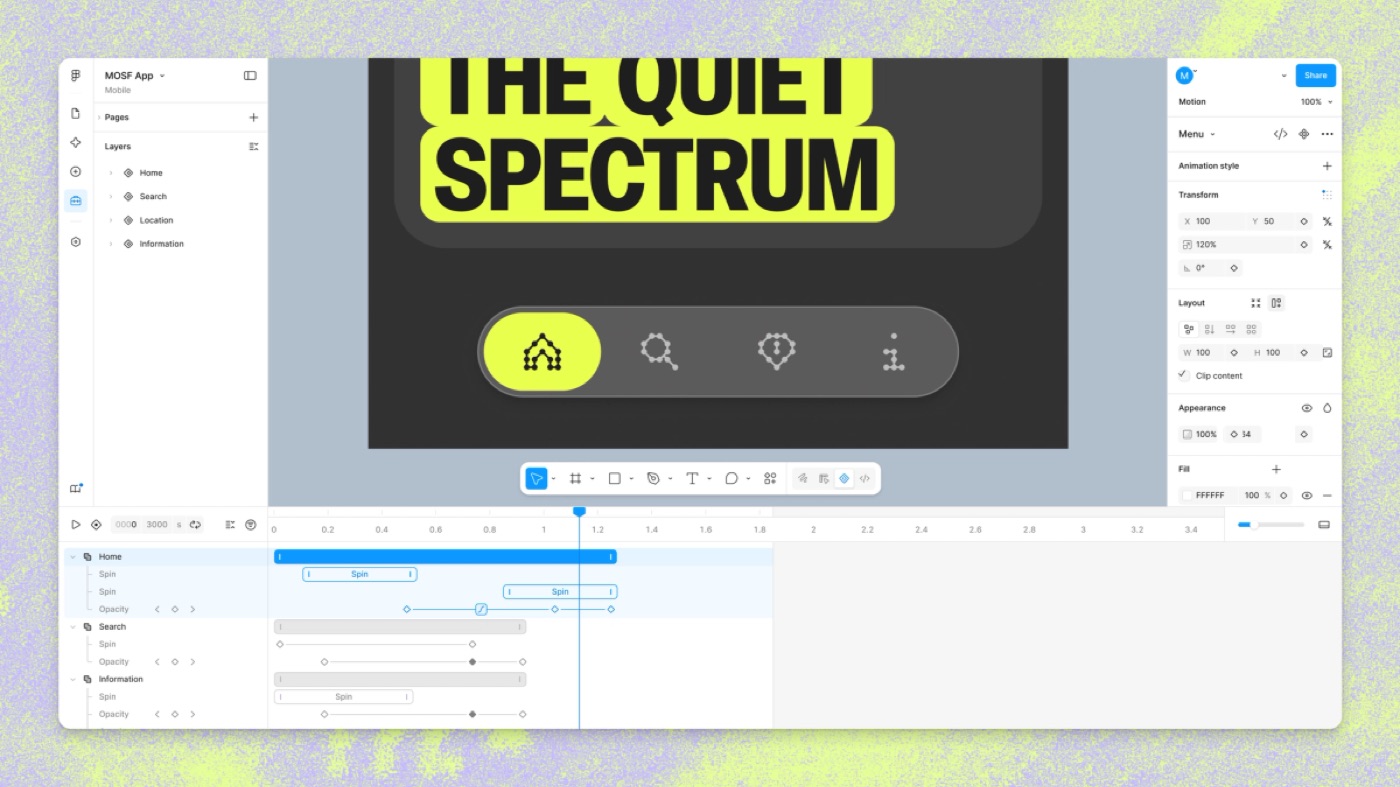
The third change is motion. Clean layers are the precondition for any animation. A Rive file, a Lottie export or a Figma Motion timeline all need separate parts to move. An icon delivered as one compound path is a still image pretending to be a vector.
Hype vs reality
The release notes are careful. The posts reacting to them are less careful, so here is what the official pages do and do not say.
| What people say | What Figma's pages actually say | My read |
|---|---|---|
| "Figma AI icons are free now" | Generation uses Figma AI credits, shared across all AI features. The help article gives no per-icon cost. | Budget it like any AI feature. Test on a small set before generating a library. |
| "It matches your brand automatically" | You can attach references to guide the style. | A reference guides, it does not enforce. Grid, stroke weight and corner rules still need a human check. |
| "The icons animate themselves" | The layer structure makes vectors ready to animate in Figma Motion, by you or the agent. | Ready to animate is not animated. The motion idea is still yours. |
| "Figma Motion does everything" | Motion is in open beta. Starter has limited exports, and the agent for motion needs a paid plan. 3D transforms are on a waitlist. | Good for UI motion and handoff. For interactive, state-driven animation I still reach for Rive. |
| "Vectorize any image" | Complex or low-resolution images may not vectorize well. | Great for clean sketches and lettering. Photos and noisy scans will still need cleanup. |
What is missing, honestly: there is no word on icon grids, optical sizing or pixel snapping in the notes. Those are the things that make an icon set feel professional at 16 px. I would assume the agent does not know your grid until you see otherwise in your own file.
How I would use it in my workflow
My Figma frames stopped going to a developer a while ago. They go to Claude through the Figma MCP, and some go to a video model. I wrote about that whole loop in my AI design workflow from idea to App Store. In that loop, Figma is the brief. Whatever is clean in Figma comes out clean in code. Whatever is messy in Figma, the model invents around.
That is why this update matters more to me than a nicer image generator would. A grouped, stroke-based icon is something Claude can read through the MCP and turn into an SVG component with props for stroke and color. A flattened blob is something it has to guess at.
Where I would use it first:
- Exploration. Ten directions for an empty-state illustration in the time it takes to sketch two. I would still pick and refine by hand.
- Filling a set. Attach the existing icons, ask for the missing ones, then check every one against the grid.
- Motion-ready parts. Generate an illustration with separate layers, then animate it. In Stitch, my Rive CLI Halloween game, one Rive file holds a shader world and a scripted hand, driven by Luau scripting and data binding. Every piece of that only works because each part is its own layer. That is the structure this update finally gives AI vectors.
Where I would not use it: the one moment in a product that has to feel like nobody else's. In Payno, the card you shatter to unfreeze, the ice and the three taps are the product. That kind of wow moment is designed first and by hand, then everything around it can be faster. Icons are the opposite of that: they should be quiet, consistent and cheap to make. Letting AI take the quiet work so I can spend more time on the loud work is the trade I want.
If you are deciding between motion tools for those animated icons, my Rive vs Lottie comparison covers when each one makes sense, and what a design engineer does explains why I care about the file reaching code in one piece.
Figma AI icons FAQ
Can Figma AI create icons?
Yes. The Figma agent generates icon sets and vector illustrations directly on the canvas from a prompt or reference images. Since November 5, 2026, the output uses editable strokes, grouped layers and can follow a style reference you attach.
Is the Figma AI icon generator free?
It is available on Starter as well as paid plans, but it uses Figma AI credits, which are shared across all Figma AI features. Figma's help article does not list a per-icon cost, so check your credit balance before generating a large set.
Can I animate Figma AI icons?
Figma says the new layer structure makes the vectors ready to animate in Figma Motion, by you or by the agent. Figma Motion is in open beta, exports MP4, GIF, SVG and WEBM, and gives developers CSS, JSON or React code in Dev Mode. Agent help for motion requires a paid plan.
Will AI icons replace icon designers?
It replaces the repetitive part: drawing the twenty-first icon in a set that already has a style. It does not replace deciding what the style is, checking the grid, or designing the illustration that carries a brand. I wrote more about that line in the future of UI UX design with AI.
A quick checklist before you generate your next icon set
- Attach three to five of your best existing icons as the reference, not your whole library.
- Check every result on your real grid, at the smallest size you ship.
- Confirm the line work is strokes, then set weight and caps from your tokens.
- Rename and group layers before anything goes to code or to a motion timeline.
- Keep the one hero illustration hand-made.
If you are building a product and want a designer who handles the icons, the motion and the code that ships them, you can hire me as your product designer, or look through my product design work and the AI experiments I have shipped first.


hello@ayoubka.com
If you have a web or mobile app idea in mind or you need some advice about product design, feel free to get in touch ✉️