
Google Stitch Loop Opens PRs on Your Live App. Who Decides?
Google Stitch Loop watches your live app and opens pull requests for security, speed and accessibility. What shipped Nov 18, the catch, and where design fits.
On November 18, 2026, Google Labs announced Google Stitch Loop, a long-running product agent that connects to your GitHub repo and your live product data, suggests improvements, writes the code in a sandbox and opens a pull request for you to review. It ships with three default loops (cybersecurity, latency and accessibility), and you can add your own, like a loop for checkout conversion. Nothing merges without a human. Right now it is a waitlist, with priority for eligible Google AI Ultra users. My verdict: this is the first AI design tool I have seen that cares about what happens after launch, and that is the right direction. But a loop can find where a metric drops. It cannot tell you why people feel lost. That part is still design work.
Here is what Google actually shipped, what it changes for product designers, where the hype runs ahead of the announcement, and how I would plug it into the way I already work, from a Figma frame to a merged pull request.
What Google Stitch Loop actually is
The official source is the Google Labs post "Introducing Stitch Loop: A new way to build and evolve products", written by Justin Toupin, Director of Product Management at Google Labs. Stitch itself was the AI design canvas that turns prompts into UI. Loop is a new direction: instead of generating a first screen, it keeps working on a product that is already live.
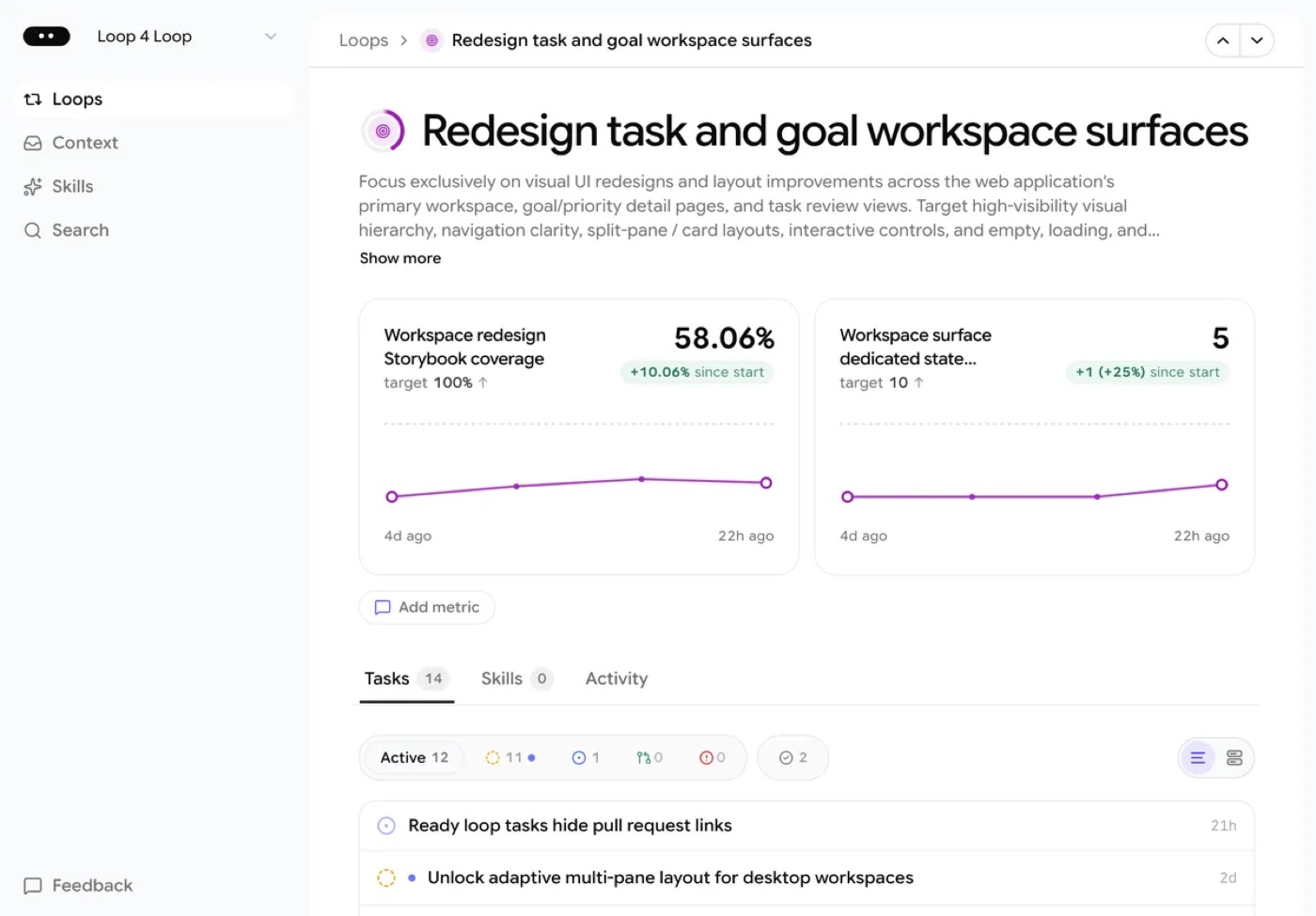
Look closely at the screenshot Google chose. The example loop is not a security scan. It is a UI redesign loop, tracking metrics like Storybook coverage against a target, with a list of tasks such as a multi-pane layout for desktop. Google is clearly pitching Loop at design work, not only at engineering hygiene.
The setup, according to Google:
- Connect context. GitHub plus product signals like logs, user behavior and feedback, through over 180 integrations, custom MCP servers or local CLI uploads.
- Pick loops. Cybersecurity, latency and accessibility come by default. You can add custom loops toward any measurable goal.
- Run the cycle. Each loop goes through four steps: Suggestions (opportunities backed by evidence from your product), Solutions (options with trade-offs, scope and visual design options where relevant), Build (code written in an isolated cloud sandbox, then a GitHub pull request, with screenshots or video when useful) and Reflect (it watches live data after the goal is met, in case the metric slips).
- Keep the final call. Google is explicit: nothing merges until you review the pull request.
The security loop pairs Gemini 4 Carbon with CodeMender, a code security agent from Google DeepMind. Loop also works as a context layer for coding agents like Google Antigravity through the Stitch CLI and MCP, and there is a Slack integration where you mention @stitch to get daily digests or start a loop. The waitlist is at stitch.google.com/loop/waitlist.
What it changes for product designers
Most AI design tools in 2026 compete on the first ten minutes: prompt, screen, wow. Google Stitch Loop competes on month three. That is a different job, and honestly a more important one. Products rarely fail because the first screen was ugly. They fail because nobody went back to fix the step where people quit.
Three things change for designers if this works as described.
Accessibility stops being a ticket nobody picks up. Contrast, focus order, missing labels, tap targets. These are known problems with known fixes, and they sit in backlogs for months because they never feel urgent. An agent that finds them, proposes the fix and opens a pull request with a screenshot removes the excuse. The designer's job becomes reviewing whether the fix respects the system, not filing the bug.
The pull request becomes a design surface. When Loop proposes "visual design options" and attaches screenshots to a PR, design review moves into GitHub. That is where I already work. At ViewStats I went from Lead Product Designer to design engineer: I worked in the codebase with Cursor, Claude Code, React and TypeScript, built components and opened pull requests myself (it is all in the ViewStats creator tools case study). Designers who cannot read a PR will be reviewing AI changes through someone else's eyes.
Custom loops turn metrics into briefs. "Improve checkout conversion" is Google's own example. That is a design brief written as a number. Whoever defines the loop decides what "better" means, and that is the decision I want a designer in the room for.
Hype vs reality
The announcement is strong. A few things it does not say yet:
- It is a waitlist, not a product you can use today. Google calls it an experiment. Ultra users get priority. Plan for it; do not plan around it.
- No public pricing. The post mentions Ultra priority and nothing about what a loop costs to run continuously against a real codebase.
- No stated limits. How big a repo, which stacks, how many loops, how noisy the suggestions are: none of it is in the post.
- Stitch has quality complaints already. On Google's own developer forum, people have reported a drop in design quality after a Stitch update. An agent that writes UI code into your live product inherits that taste problem.
- Metrics are not reasons. This is the big one, and I will spend the next section on it.
| Job | What Stitch Loop says it does | What still needs a designer |
|---|---|---|
| Find the problem | Spots drops and issues from logs, behavior and feedback | Asking users why, in their own words |
| Propose a fix | Options with trade-offs and visual design options | Choosing the option that fits the product's voice and system |
| Accessibility | Default loop, PRs with fixes | Checking the fix does not break the design system or the motion |
| Ship | Writes code in a sandbox, opens a PR, never auto-merges | Reviewing the PR like a design review, not a rubber stamp |
| Define success | Works toward a measurable goal you set | Deciding which number matters, and which one would hurt users if you chase it |
The part a loop cannot see: why people get stuck
At ViewStats, many creators signed up but never connected their YouTube channel. A funnel would have shown that drop in a day. Any agent watching the metric would have found it too. What the numbers did not show was the reason: creators did not understand what they would gain by connecting. We found that through creator interviews, Discord feedback and support requests, not through the dashboard.
The fix was not a better button. It was a change in order: show value first, ask for trust second. Onboarding moments, empty states and contextual prompts that explained the payoff before asking for access. Channel connection went from 13% to 65%+. I wrote the full story in onboarding UX best practices from the 13% to 65% fix.
Now imagine a custom loop on that same metric. It would probably suggest moving the button, shortening the form, adding a nudge. Some of those might move the number a little. None of them would have found the actual problem, because the problem was a feeling: "why should I give you my channel?" That is why I keep saying designing AI features is designing trust, and it is the core of my guide to AI product design people trust.
So my take is simple. Let Loop own the known problems (security, speed, accessibility). Keep humans on the unknown ones.
How I would use Google Stitch Loop in my workflow
My process today goes from a Figma frame, through Claude and the Figma MCP, to working code I ship myself. You can see the result in my AI design experiments: physics, Rive motion, WebGL and sound with Web Audio and ElevenLabs, all live builds, not mockups. What that workflow does not have is a step after launch. Once an experiment is live, nobody watches it but me.
That is the gap Loop fills. Here is how I would set it up once I get access:
- Start with the accessibility loop only. It has the clearest definition of "correct", so it is the easiest place to judge if the agent's pull requests are any good.
- Review every PR like a design crit. Open the screenshots, check spacing, tokens and motion. A contrast fix that changes a brand color is not a fix.
- Write custom loops only after research. Talk to users first, find the real reason, then let a loop measure the change. Never the other way around.
- Feed it the design system as context. Loop accepts custom MCP servers. The Figma MCP is how I already give Claude my design intent; the same idea should apply here.
- Protect the weird parts. My experiments have shattering cards and physics on purpose. A latency loop that "optimizes" away the delight would be a regression. Say so in the loop's goal.
If you are a designer who has never opened a pull request, this is the month to start. I explained the first step in what a design engineer actually does, and why prompting alone is not enough in vibe coding for designers.
FAQ about Google Stitch Loop
What is Google Stitch Loop?
It is an experimental product agent from Google Labs, announced November 18, 2026. It connects to your GitHub repo and live product data, finds improvement opportunities, writes fixes in a sandbox and opens pull requests. Default loops cover cybersecurity, latency and accessibility, and you can add custom ones.
Is Google Stitch Loop free?
Google has not published pricing. Access starts with a global waitlist, and eligible Google AI Ultra subscribers get priority. Treat it as a paid-tier experiment until Google says otherwise.
Does Stitch Loop merge code automatically?
No. According to Google, it opens a pull request and nothing merges until you review it. That makes the reviewer, designer or developer, the real quality gate.
Will Google Stitch replace Figma or product designers?
Not from what was announced. Loop improves a product against goals someone defines, using signals someone connects. Deciding the goal, understanding why users struggle and judging whether a fix fits the product are still human calls. It replaces the backlog of known fixes, not the designer.
Can designers use Stitch Loop without coding?
You can probably read its suggestions and screenshots without code. But its output is a GitHub pull request, so designers who can review a diff, even roughly, will get far more out of it.
If you are building an AI product and want a designer who can define the right goal, read the pull request and ship the fix, work with me as your product designer. And if you get early access to Stitch Loop before I do, I would love to see what its first accessibility PR looks like.

hello@ayoubka.com
If you have a web or mobile app idea in mind or you need some advice about product design, feel free to get in touch ✉️